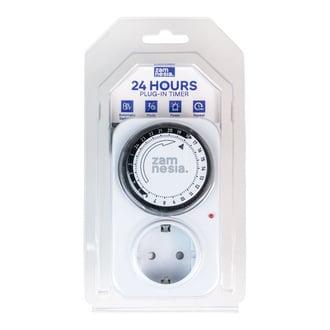
The Zamnesia 24h Plug-In Timer is a mechanical grow timer that automates daily on/off cycles for grow lights, fans and pumps — set it once, and it repeats the same 24-hour program every day until you change it. No menus, no apps, no firmware updates, no settings that quietly reset when the power flickers. Just a clock face, plastic pins, and a socket you plug into the wall.
Why a mechanical 24h plug-in timer still beats digital in a grow tent
Because it does one thing and does it without surprises. The Zamnesia 24h Plug-In Timer is the kind of kit we'd hand a first-time grower without a second thought: you push the pins down for the hours you want power on, leave them up for hours off, plug your light (or fan, or pump) into it, and walk away. The same 24-hour cycle repeats every day forever.
Digital timers have their place, but they also have menus that beginners mis-set, backup batteries that die quietly, and the occasional "why is my 18/6 schedule now 4/20" moment after a brownout. The mechanical version just keeps turning. If the power cuts for an hour, the clock loses an hour — that's it. No reset to 00:00, no flashing display, no scheduled blackout in the middle of your flowering photoperiod.
What the Zamnesia 24h Plug-In Timer actually does
It cycles a single plug socket on and off according to whatever 24-hour pattern you set with the pins around the dial. That's the whole feature list, and for grow tent automation that's all you need.
- Grow lights on an 18/6 veg schedule — push down the pins for 18 hours, leave 6 up, done
- Grow lights on a 12/12 flowering photoperiod — half the dial down, half up
- Extraction or oscillating fans running in sync with lights-on to manage heat and humidity spikes
- Water pumps for hydro or self-watering setups — short pulses several times a day
- CO₂ equipment timed to the photoperiod (plants only use CO₂ when the lights are on)
Specifications
| Type | Mechanical 24-hour plug-in timer |
| Cycle | Repeats the same daily on/off program every 24 hours |
| Programming | Push-pin dial — one pin per time segment |
| Interface | None (no display, no menus, no app) |
| Best suited for | Grow lights, fans, pumps, CO₂ equipment |
| Brand | Zamnesia (own-brand growshop range) |
Mechanical vs digital: which timer should you actually buy
If you want simple and bulletproof, mechanical. If you want minute-level precision and multiple programs per day, digital. Here's how the Zamnesia 24h Plug-In Timer sits against the alternative in the Zamnesia growshop range:
| Feature | Zamnesia 24h Mechanical | Typical digital grow timer |
|---|---|---|
| Setup | Push pins down on a dial | Menu navigation, button presses |
| Smallest interval | Per pin segment (chunky) | Down to 1 minute |
| Programs per day | One repeating 24h cycle | Multiple on/off events |
| Behaviour after power cut | Clock lags by the outage time, keeps running | Often resets; depends on backup battery |
| Failure modes | Mechanical wear over years | Battery dies, settings wipe, screen freezes |
| Best for | Lights, fans, pumps on a fixed daily schedule | Complex multi-stage automation |
For 90% of home grow tents running a basic 18/6 or 12/12 photoperiod, the mechanical timer is the right tool. We'd only push you toward digital if you genuinely need multiple on/off events per day at precise times — for instance, a hydroponic pump cycling every two hours for 15 minutes.
Pairs well with anything in the Zamnesia growshop range that needs power: an LED grow light, a clip-on or oscillating tent fan, a carbon filter's extraction fan, or a water pump in a small hydro setup. If you're building a tent from scratch, plug the timer between the wall socket and your lights first — it's the single cheapest piece of automation you can add and the one that makes the biggest difference to consistency.
How to set up the Zamnesia 24h Plug-In Timer
- Plug the timer into a wall socket. Some mechanical timers need a few minutes of mains power to wind the internal motor before they hold time accurately — give it a moment.
- Turn the central dial clockwise until the current time on the dial lines up with the arrow or marker on the housing.
- Push the pins down for every time segment you want power on. Leave pins up for power off. (Some models work the opposite way — check your unit; the principle is the same.)
- For an 18/6 veg schedule: push down 18 hours of consecutive pins, leave 6 up. For 12/12 flowering: 12 down, 12 up.
- Plug your grow light, fan, or pump into the socket on the timer.
- Make sure the manual on/auto switch (if present) is set to "auto" or timer mode — not permanent on.
- Walk away. The timer will repeat that same 24-hour program every day until you change the pins.
Honest limitations — what this timer is not
It's a chunky mechanical device. The pin resolution is usually 15 or 30 minutes per segment, so you can't set "lights on at 06:47". It only handles one on/off program — if you need lights on twice a day at different intervals, you'll want digital. And it makes a faint mechanical tick; in a quiet bedroom you'll hear it if your ear is right next to the socket. In a grow tent with a fan running, you won't notice.
Also worth knowing: check the load rating printed on your specific unit before plugging in heavy gear. A small mechanical timer running a 600W HPS ballast is fine; daisy-chaining four lights through one timer is asking for trouble. When in doubt, use a contactor or relay between the timer and the load.
Frequently Asked Questions
Does the Zamnesia 24h Plug-In Timer keep its schedule after a power cut?
The schedule itself is set by the pins, so it never wipes — but the internal clock runs on mains power. After an outage, the clock lags by however long the power was off, so you may need to re-sync it by turning the dial to the current time. The on/off pattern is unchanged.
Can I run my grow light through this timer?
Yes — that's the main use case. Check the wattage rating on your specific timer unit and compare it to your light's draw. Single LED panels and most CFL/HPS setups under the rated load are fine; very high-wattage HPS ballasts or multiple lights on one timer should go through a contactor.
How is this different from a digital plug-in timer?
The mechanical version repeats one 24-hour on/off cycle, programmed by pushing pins on a dial. Digital timers offer multiple events per day and minute-level precision but rely on menus and backup batteries. For a simple 18/6 or 12/12 grow schedule, mechanical is faster to set and harder to mis-program.
Can I use it for fans and pumps as well as lights?
Yes. The timer doesn't care what's plugged in — grow lights, extraction fans, oscillating fans, water pumps, CO₂ equipment all work. The same 24-hour program repeats daily for whatever device sits in the socket.
What's the smallest on/off interval I can set?
That depends on the pin segments around the dial — typically 15 or 30 minutes per segment on mechanical timers in this class. If you need shorter pulses (for example, a hydro pump cycling for 5 minutes every hour), a digital timer is the better tool.
Do I need a timer at all for a grow tent?
Yes, if you're growing photoperiod plants. Cannabis and most other photoperiod crops flip between vegetative and flowering stages based on the light schedule, so you need consistent on/off times every single day. Doing it manually for months is how mistakes happen.
Last updated: April 2026